Popular Words: Family Game
- 4.8
- Rating
- 10.00M
- Installs
- Free
- Price

 Analysis by App-foxy
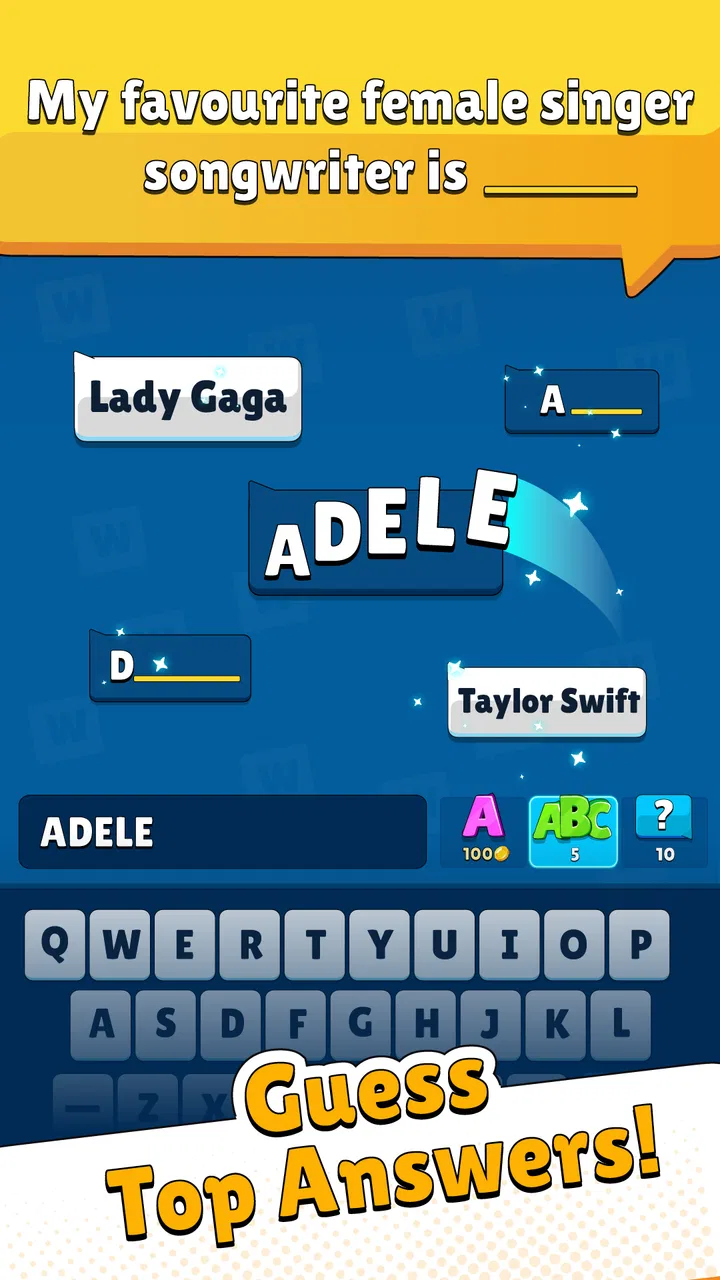
I found Popular Words: Family Game most enjoyable when treated as a shared-device guessing game rather than a solo trivia test. The basic challenge is simple: a prompt appears, and players try to name the five answers that are likely to be most popular. That small change in perspective matters. You are not only asking, “What is correct?” You are trying to predict what a wider group of people would say, which makes ordinary conversations surprisingly useful.
That makes it a natural fit for a household waiting for dinner, a relaxed evening on the sofa, or a short break when nobody wants to learn complicated rules. I played it with the expectation of quick questions and found that the best moments came from disagreement: one person gives the answer that feels obvious, another argues for a more common phrase, and the group discovers how differently they interpret the same prompt. It is a trivia game, but its real subject is shared intuition.
How the shared-device format works in everyday life
The game is made by Unico Studio and is free to start, which removes much of the hesitation involved in handing it around at home. Its Everyone age rating also makes it easier to consider for mixed-age use, although that label should not replace a parent’s judgment about how a particular question fits a child’s understanding. The game’s premise is accessible enough for people who do not usually play mobile games, and nobody needs to master a complicated control scheme before joining in.
You May Also Like

 Pandora - Music & Podcasts
Pandora’s Music Is Easy to Start, but Harder to Recover
Pandora’s strength is its low-effort path from a seed to a station. Its weak spot is how much confidence it asks you to place in connection, setup, and quiet recovery.

 8 Ball Pool
 Is Built on Rivalries, Rematches, and Routine
A close look at the rivalries, rematches, shared routines, and unanswered safety questions that turn a quick pool match into a persistent mobile community.

 Samsung Music
’s Quiet Strength Is Playing What You Already Own
Its reach comes less from spectacle than from dependable access to a personal library. That simplicity is both the app’s strongest retention engine and its ceiling.

 AccuWeather: Weather Radar
AccuWeather Review: A Quick, Clear Forecast for Everyday Decisions
For everyday plans, the best forecast is the one you can understand quickly. AccuWeather makes rain timing, radar, and local conditions easy to act on, with a few trade-offs.

 Hill Climb Racing
Why Hill Climb Racing Still Turns Crashes Into One More Run
A tiny car, a bumpy hill and one more upgrade: Hill Climb Racing keeps resurfacing because its simple chaos makes every near-miss feel personal.

 AliExpress - Shopping App
AliExpress Makes Global Shopping Feel Personal, but Shoppers Bear the Risk
AliExpress turns a global marketplace into a pocket-sized discovery engine. Its reach is useful, its shopping loop compelling, and its trade-offs easy to miss.
More From Our News Desk
View All News


A realistic household session might begin with one person opening a round while two or three others sit nearby and call out suggestions. The phone stays with the person entering answers, but the discussion belongs to everyone. That is important because the game does not need to be the sole focus of the room. Someone can be preparing snacks, a younger player can suggest answers aloud, and the person holding the device can decide which response to submit.
I would not describe it as a replacement for a full board game night. It is better at filling the gaps around one. A board game normally gives every participant a defined turn, a visible score structure, and a longer arc. Popular Words is lighter. It works when the group has ten minutes, when attention is divided, or when people want an activity that can stop without unpacking anything. The trade-off is that the experience depends heavily on the energy of the people around the phone.
For a couple, the guessing format creates a friendly argument about what “most people” would choose. With children, it can become a vocabulary exercise without feeling like homework. With grandparents or guests who do not play games, the familiar-question format is less intimidating than a fast action title. I especially like that the central skill is not reflexes; a player who thinks carefully or explains an unusual answer can contribute just as much as someone who is quick with the device.
Why popular answers are more interesting than merely correct ones
Traditional trivia rewards knowledge of facts. Here, the useful question is often, “What answer would the largest number of people recognize?” That creates a subtle tension between personal taste and social expectation. If the prompt concerns a common activity, a food, or a familiar expression, the answer that feels most personal may not be the answer that earns progress. I found it helpful to separate my own preference from my guess about the crowd.
That distinction gives families a practical way to play together. Younger players can explain what their classmates might say, while adults may rely on broader life experience. Neither viewpoint is automatically superior. The discussion becomes part of the entertainment, and a supposedly obvious answer can reveal a generational difference rather than a lack of knowledge.
One useful habit is to ask the group for three answers before anyone commits to one. The first response is often personal, the second may be more conventional, and the third can expose what the group thinks a general audience would choose. This makes the game more thoughtful without adding a formal rule. It also prevents the person holding the phone from deciding everything silently.
Setting boundaries before passing the phone around
Because the game is designed for quick shared play, the most important setup is social rather than technical. Before starting, I recommend deciding who is participating, whether people will answer individually or as a team, and whether the phone will move between turns. Those choices prevent a common problem with shared-device games: one confident player takes control while quieter players become spectators.
For a family session, a simple rotation works well. One person reads the prompt, everyone offers suggestions, and the device passes to the next person after the round. If the screen remains with one player, I would still let every participant propose an answer before entering it. This keeps the activity collaborative and avoids turning the game into a private test for the person who happens to own the phone.
It is also worth agreeing on how much outside help is acceptable. Looking up an answer defeats the point, but discussing it with the room is exactly what makes this title suitable for shared use. If a child asks what a word means, explain it rather than treating the question as a failure. The game is more enjoyable when the household treats unfamiliar vocabulary as part of the conversation.
Account boundaries deserve a little attention as well. A shared phone can blur who is playing and who is simply nearby. I would avoid assuming that every score, purchase, or progression choice belongs to the whole household. Use the device owner’s account carefully, and make sure children know when they are playing under an adult’s profile. The game is free, but it includes in-app purchases ranging from $0.99 to $64.99 per item, so a household should establish its own purchasing rule before handing the device to a child.
That does not mean the game is unsuitable for families. It means the comfortable shared setting should not be confused with automatic account sharing. A child may be allowed to suggest answers while an adult remains responsible for any store or purchase decisions. In my view, that is the cleanest arrangement: participation is open, while spending and account decisions stay with the device owner.
Coordinating a session without making it feel formal
The easiest way to keep a mixed group involved is to give everyone a small role. One person can read the wording, another can collect spoken answers, and a third can enter the final choice. On a larger sofa, rotate those jobs instead of letting the fastest speaker dominate. This is especially useful when children are present, because they may need a moment to formulate an answer but can still offer excellent guesses.
Teams are often better than strict individual competition when ages and confidence levels vary. A child and an adult can discuss whether an answer sounds broadly popular, while two siblings can compare their different assumptions. If the group prefers individual play, I would still allow a short discussion period before each submission. The game’s appeal comes from reasoning together, so eliminating all conversation removes one of its strongest qualities.
Another practical tip is to choose the session length in advance. A short round is ideal when people are waiting for something, while a longer sitting works after dinner. Since the game is built around repeated prompts, stopping after a natural break feels easier than stopping a story-driven game midway through. That makes it a good option for households whose schedules rarely line up perfectly.
There is a trade-off here. Shared play can make the game warmer, but it can also make progress slower. If one person wants a quick solo activity, the discussion becomes friction rather than a benefit. I would use it alone when I want a few mental prompts, but I would not choose it over a focused solo trivia app for deep knowledge practice. Its strongest feature is the conversation around the answer, not an extensive lesson or a detailed competitive system.
Age, trust, and the limits of the Everyone label
The Everyone rating is reassuring for a general household audience, and the rules are easy enough for many ages to understand. Still, age suitability is more than a label. A child may know the words in a prompt without understanding the cultural reference behind them, while an older player may find some questions too obvious. Adults should stay involved when younger children are playing, particularly if a prompt needs explanation.
I would also set expectations about disagreement. Since the game asks players to predict popular answers, an answer can feel reasonable and still fail to be among the expected choices. That is not necessarily a mistake by the player. It is a reminder that the game measures shared popularity, not truth. Explaining this beforehand helps children avoid treating an unsuccessful guess as evidence that they are “bad” at trivia.
Trust matters in another way: players should be comfortable saying that they do not know a phrase or do not share the group’s assumption. A good household session leaves room for that. If the loudest person mocks unusual suggestions, the game quickly becomes unpleasant. I prefer treating every answer as a hypothesis about the public rather than a judgment of the person who said it.
For adults, the main concern is not difficulty but repetition and context. People seeking demanding general-knowledge questions may find the popularity angle less satisfying than a conventional quiz with one objectively correct answer. People who dislike group debate may also prefer a standard solo trivia format. This game is best for players who enjoy guessing how other people think, not only demonstrating what they personally know.
What the current release offers and where it fits
The current version is 1.4.2, and the game supports devices running Android 7.1 or later. It has reached over 10 million installs, with an average rating of 4.8 from around 96 thousand ratings and roughly 3.5 thousand written reviews. Those figures suggest that the simple format has found a broad audience, but popularity alone does not make it right for every household. I would focus more on whether your group enjoys verbal guessing than on the size of its audience.
Compared with a conventional trivia app, this title is less about building a reliable store of facts. A standard quiz can be better for someone who wants categories, learning progress, or a clear right-or-wrong result. Popular Words is more forgiving of partial knowledge, but it can also feel less precise. You may know an answer is sensible and still miss because the expected response reflects common wording rather than your preferred wording.
Compared with a party game, it is easier to start and less dependent on physical materials. You do not need a table full of cards or a long explanation before the first prompt. On the other hand, a dedicated party game may provide richer social roles, stronger team mechanics, or more deliberate pacing. This app is the convenient middle ground: more interactive than a private quiz, but lighter than a full party box.
Compared with a word puzzle, it asks for social prediction rather than spelling or deduction. That makes it approachable for players who do not enjoy anagrams or timed vocabulary challenges. The weakness is that a person looking for a quiet, deeply strategic puzzle may find the answers too dependent on discussion and common sense. Choosing it is really choosing a style of thinking: public instinct over private calculation.
The free entry point is another advantage for casual households, but the in-app purchase range means I would not treat the game as entirely cost-free in a shared environment. Decide whether optional spending is allowed, especially if children use the device. I would personally begin with the free experience and only consider a purchase if the household has played enough to know that the format remains enjoyable over time.
Small techniques that improve the experience
First, encourage players to distinguish between a broad answer and a narrow one. If a prompt allows several phrasings, the group should discuss which wording a large audience is most likely to use. This is a more advanced skill than simply naming something related to the subject, and it helps explain why a technically valid response may not perform well.
Second, use disagreement as information. If half the room chooses one answer and the other half chooses another, do not rush to silence the minority. The split may show that the prompt has more than one natural interpretation. That makes the round interesting even when the final result favors one side. It also teaches children that popular opinion is not the same as universal opinion.
Third, keep a spoken record of memorable misses rather than only celebrating successful guesses. In a household, the funniest moment may be the answer everyone thought was obvious but nobody else seemed to choose. Recalling those moments gives the game a social memory that a normal score screen cannot provide.
Finally, match the format to the group. For younger players, explain unfamiliar wording and let them contribute without pressure. For adults who want competition, restrict discussion time informally. For a tired household, play cooperatively and stop before the conversation becomes argumentative. The app supplies the prompts, but the quality of the session depends on these small decisions.
My household verdict
I recommend Popular Words: Family Game when you want a low-pressure activity that turns a phone into a conversation starter. Its strongest use is not silent progress through trivia questions; it is the moment when several people defend different ideas about what “everyone” would say. That makes it particularly effective for households, casual guests, and mixed-age groups that need rules simple enough to explain in seconds.
I would skip it if your priority is rigorous fact testing, a deep solo progression system, or a game that protects every player from social pressure. A traditional trivia app is a better choice for structured knowledge practice, while a larger party game may be better for a planned event. This title works best in the space between those options: quick to open, easy to share, and entertaining because people interpret the same prompt differently.
The sensible approach is to establish participation and purchase boundaries before children or guests use the device. Keep account responsibility with the owner, let everyone contribute verbally, and remember that the Everyone rating does not remove the need for age-aware conversation. With those expectations in place, the free game becomes a practical addition to a family’s collection rather than another app that sits unused.
My final impression is favorable because the concept stays focused. Guessing popular answers is immediately understandable, yet it creates enough disagreement to support repeated short sessions. I would not promise that every prompt will suit every age or that the format will satisfy serious quiz fans. But for a household looking for an easy shared activity, the best reason to try it is the conversation it creates around each answer, not the phone screen itself.
FAQs for Popular Words: Family Game
01What is Popular Words: Family Game about?
Popular Words: Family Game is an engaging word association game designed for families. Players are challenged to guess common words based on given prompts. It's perfect for family gatherings, encouraging teamwork and quick thinking. With varying difficulty levels, it caters to both kids and adults, making it a versatile choice for all ages.
02Is Popular Words: Family Game suitable for all age groups?
Yes, Popular Words: Family Game is designed to be suitable for all age groups. The game features a range of difficulty levels, ensuring that both children and adults can enjoy playing. Its family-friendly content and straightforward gameplay make it accessible and entertaining for everyone, from young kids to grandparents.
03Does Popular Words: Family Game require an internet connection?
Popular Words: Family Game can be played offline, making it convenient for travel or areas with limited internet access. However, certain features, like leaderboard updates and any available in-game purchases, may require an internet connection. Overall, it offers flexibility for both online and offline play.
04Are there any in-app purchases in Popular Words: Family Game?
Yes, Popular Words: Family Game includes optional in-app purchases. These can enhance the gaming experience by offering additional content, such as new word packs or hints. While the base game is free to download and play, these purchases are available for those who wish to expand their gameplay options.
05How does Popular Words: Family Game support multiplayer interaction?
Popular Words: Family Game supports both local and online multiplayer modes. Families can play together on a single device, taking turns to guess words, or compete with friends and family online. This flexibility adds to the game's appeal, allowing players to enjoy interactive sessions regardless of their location.
Pros
- Engaging multiplayer mode enhances family interaction.
- Simple interface suitable for all ages.
- Wide variety of word categories keeps it fresh.
- Offline mode allows play without internet.
- Regular updates introduce new features and words.
Cons
- Ads can be intrusive during gameplay.
- Limited free content; in-app purchases required.
- Occasional lag on older devices.
- Lacks voice chat for multiplayer mode.
- No option to customize word categories.

Popular Words: Family Game
Gallery